

Every Section 18A approved organisation in South Africa now has to report its donation certificates to SARS twice a year as IT3(d) third-party data. For most nonprofits that has meant wrestling with the SARS eFiling platform, a file specification written for banks, and a submission process that rejects your whole return because one donor’s ID number is a digit short.
ActiveDonor removes the whole exercise. IT3(d) submission is included at no additional charge on every annual plan. You tick the Section 18A certificates for the period, the app checks each one against the SARS field rules, and you click Submit to SARS. The response comes back into the same screen. No file downloads, no uploads, no HTTPS certificates, no tax practitioner on retainer.
What started as an October 2024 promotion became a standing feature in May 2025, and it has been extended steadily since: pre-submission compliance checks, live SARS response tracking, one-click nil returns, revocations and corrections, and a full submission history. This guide covers what IT3(d) is, why it is hard, and how the process now works from inside ActiveDonor.
Current submission period: 2026-8 Covers Section 18A certificates issued from 1 March to 31 August 2026. Due at SARS by 31 October 2026. The 2026-8 period is open in ActiveDonor now.
What is IT3(d)?
IT3(d) is the SARS third-party data return for Section 18A tax-deductible donation certificates. Since the 2023 reporting changes, any organisation approved to issue Section 18A certificates must send SARS a record of every certificate issued, including the donor’s details, the donation amount and date, and the certificate number. SARS then matches that data to the donor’s own tax return.
You will see it written as IT3(d), IT3D and sometimes just “IT3 third-party data”. They all mean the same return. The rest of this guide uses IT3(d), which is what SARS and the ActiveDonor product use.
The return is submitted twice a year, and a return is required even if you issued no certificates in the period (see nil returns below).
Why IT3(d) submissions are hard
The four problems we heard from PBOs in 2024 have not gone away for organisations doing this by hand. Here is each one, and how the process looks in ActiveDonor now.
1. Non-compliant Section 18A certificates
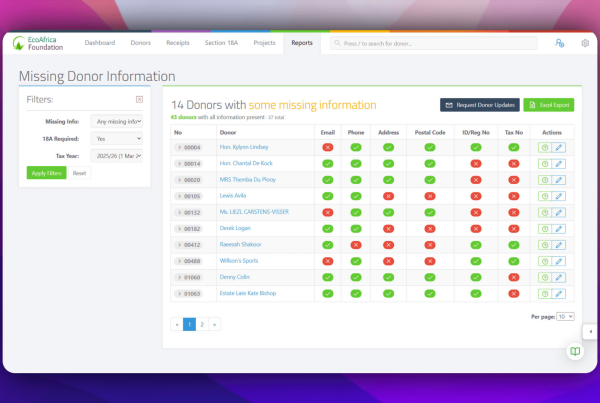
Many organisations issue Section 18A certificates that are missing fields SARS requires: a donor ID or registration number, a physical address, a valid trading name, a unique certificate number. Each of those becomes a rejection when the data reaches SARS.
In ActiveDonor: every certificate you select for submission is checked against the SARS field rules before anything is sent. Non-compliant certificates are highlighted in red and held back, and a confirmation screen tells you exactly how many compliant certificates will go. You fix the held-back ones at your own pace and submit them in a follow-up run.
2. Onboarding on eFiling
Activating the IT3 tax type, understanding the difference between the Reporting Entity and the Submitting Entity, and working out which user roles need which permissions is a maze for an organisation doing it once every six months.
In ActiveDonor: you accept an IT3(d) Submission Authorisation Agreement inside the app. ActiveDonor becomes the Submitting Entity and your organisation stays the Reporting Entity. You do not need to create any additional SARS user roles for ActiveDonor.
3. HTTPS submission and browser certificates
The SARS third-party data channel was designed for institutions with IT departments. Submitting via HTTPS means installing and managing security certificates in your browser, and the error messages when something goes wrong are not written for a fundraising manager.
In ActiveDonor: this hurdle disappears entirely. In direct mode there is no upload step at all. ActiveDonor holds the SARS channel connection and transmits the data for you.
4. Generating the SARS file
The IT3(d) BRS (Business Requirements Specification) describes a fixed-width file with header, body and trailer records, field-level validation rules and control totals that have to reconcile. Getting it right in a spreadsheet is close to impossible.
In ActiveDonor: the file is generated automatically from the certificates you select. If you prefer to have your accountant or tax practitioner do the actual submission, you can switch to “Other” mode and the app produces the SARS-format file for them to upload themselves.
How IT3(d) submission works in ActiveDonor
The whole process runs from the IT3(d) screen in the app. If you want the feature summary rather than the walkthrough, see the Section 18A IT3(d) submission page
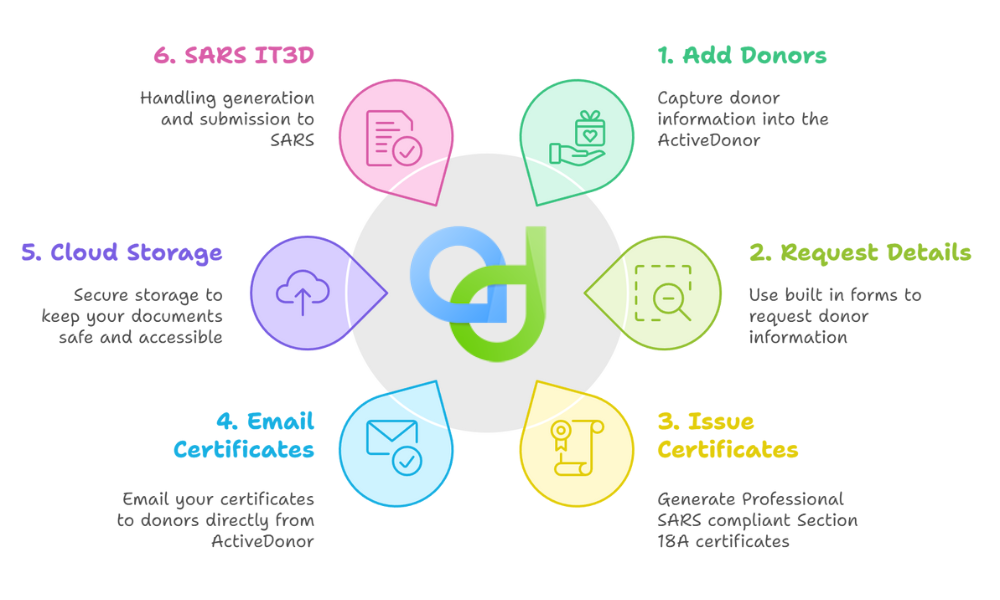
- Choose who submits. In Settings, select “ActiveDonor” for one-click direct submission to SARS, or “Other” to generate the file for a practitioner to upload. Once your first submission has gone through, these settings are locked read-only so nothing changes mid-period.
- Authorise in-app. Accept the IT3(d) Submission Authorisation Agreement. This is a once-off step.
- Pick the submission period. The period picker shows the open periods, currently 2026-8 (1 March to 31 August 2026).
- Tick the certificates. Select the Section 18A certificates issued in that period. Bulk issuance with pre-validation means most of them are already compliant before you get here. Our IT3(d) submission checklist covers what SARS expects on each certificate.
- Run the compliance check. Non-compliant certificates are flagged red and excluded. The confirmation step shows the count of compliant certificates that will be sent.
- Submit to SARS. One click. You get an email when the file is generated and again when it has been sent.
- Track the SARS response. Responses are collected automatically and shown per submission as Accepted, Accepted with Warnings, Partially Accepted, Rejected, or a file-structure failure. SARS typically responds in around five minutes; the submission dashboard shows the current average turnaround.
- Fix and resubmit. Rejected or warned certificates are listed with the SARS reason against each one. Rejected certificates return to your worklist so you can correct them and include them in the next run.
Every submitted file and every SARS response file is kept and downloadable, with a record of who submitted and when. That is your audit trail if SARS or your auditors ever ask.
Nil returns in one click
If your organisation issued no Section 18A certificates in a period, SARS still requires a nil return. It is how SARS confirms you are not simply failing to report.
In ActiveDonor, a nil return is one button. When a period has no certificates in it, the IT3(d) screen shows a Submit Nil Return option. Click it, and the nil declaration goes to SARS through the same channel with the same response tracking. The button disappears once any return exists for that period, so you cannot file a nil return by mistake over real data.
Revocations and corrections
Sometimes a certificate that has already been declared to SARS turns out to be wrong: a duplicate, a donation that was refunded, a donor who supplied the wrong ID. You can revoke a declared certificate with a reason and submit the revocation to SARS from the same screen. Declared certificates are locked from editing so your register and the SARS record stay in sync; corrections go through the revoke-and-reissue flow rather than a silent edit.
Bi-annual IT3(d) submission periods and deadlines
SARS requires Section 18A organisations to report twice a year.
| Period | Certificates issued | Due at SARS |
|---|---|---|
| Interim (e.g. 2026-8) | 1 March to 31 August | 31 October |
| Annual (e.g. 2026-2) | 1 March to end of February | 31 May the following year |
The annual return covers the full tax year, so certificates already reported in the interim period appear again in the annual submission. ActiveDonor’s multi-period filter in submission history lets you see exactly what went in each run.
Right now the 2026-8 period is open, covering 1 March to 31 August 2026, and closes on 31 October 2026. The 2026-2 annual period (1 March 2025 to 28 February 2026) closed on 31 May 2026.
ActiveDonor does not currently send deadline reminders, so put both dates in your organisation’s calendar.
What it means for your donors
Once SARS has accepted your IT3(d) data, the donation is available to pre-populate the donor’s own income tax return, so they can claim the Section 18A deduction without hunting for the certificate. Donors are increasingly aware of this, and organisations that submit cleanly and on time are the ones whose donors have the smoothest experience at filing season. It is a quiet but real reason to get IT3(d) right.
Who gets IT3(d) submission included
IT3(d) submission is included at no additional charge on all ActiveDonor annual plans. Organisations on a trial or a monthly plan will see an upgrade option on the IT3(d) screen.
Frequently asked questions
Is IT3(d) the same as IT3D? Yes. SARS uses IT3(d); you will see IT3D in older guides and in some eFiling menus. Both refer to the third-party data return for Section 18A donation certificates.
Do I still need to set up eFiling for third-party data if ActiveDonor submits for me? No. There is no eFiling third-party data setup, no IT3 tax type activation and no IT3-02 declaration for you to complete. ActiveDonor submits as the Submitting Entity and your organisation remains the Reporting Entity.
Does ActiveDonor guarantee SARS will accept my submission? No. ActiveDonor submits your data and tracks the SARS response. Acceptance depends on the data matching SARS’s rules, which is why the pre-submission compliance check exists. Anything SARS rejects comes back to you with the reason so you can fix and resubmit.
What happens to certificates that fail the compliance check? They are held back and highlighted in red. The compliant certificates go through; you correct the flagged ones and include them in a later submission within the same period.
Can my accountant or tax practitioner do the submission instead? Yes. Set the submission mode to “Other” and ActiveDonor generates the SARS-format IT3(d) file for them to upload through their own channel.
What if I issued no Section 18A certificates this period? Submit a nil return. In ActiveDonor that is one button on the IT3(d) screen.
How long does SARS take to respond? Around five minutes in most cases. The submission dashboard shows the current average, and you get an email at each stage.
I already submitted a certificate and it was wrong. What now? Revoke it with a reason from the IT3(d) screen and submit the revocation to SARS. Then issue a corrected certificate and include it in your next submission.
Simplify Your NPO Administration with ActiveDonor:
Trusted by South African NPOs since 2017 , ActiveDonor is a cloud-based donor management platform built for local organisations and used by more than 400 nonprofits. Focus on your mission and let the compliance run itself. ActiveDonor offers:
- One-click IT3(d) submissions direct to SARS
- Easy to use donor management
- Automated donation receipting
- Effortless Section 18A compliance
- Project and campaign fundraising tracking
- Comprehensive reporting tools
Start your ActiveDonor free trial or book a demo and we will walk you through an IT3(d) submission live.